讓您的專案觸及更多人
讓使用者能以自己的語言享有良好體驗。Weblate 串起團隊、社群與開發流程,協助您交付優質翻譯,不論是否使用 AI。
Weblate 是尊重隱私的開放原始碼軟體,您可自由選擇翻譯方式及執行環境。
比較託管與支援方案 Try Hosted Weblate讓使用者能以自己的語言享有良好體驗。Weblate 串起團隊、社群與開發流程,協助您交付優質翻譯,不論是否使用 AI。
Weblate 是尊重隱私的開放原始碼軟體,您可自由選擇翻譯方式及執行環境。
比較託管與支援方案 Try Hosted Weblate連接儲存庫後,專案持續開發時新增的字串就能交給譯者。Weblate 會將翻譯送回版本控制系統,讓開發者和譯者一起工作,不必來回傳遞檔案。
Weblate works with a local repository and commits translation changes back to version control. Keep your existing branches, translation files, and code hosting service, with attribution for contributors.
了解持續在地化協助譯者了解使用者會看到什麼。螢幕擷圖、相鄰字串和來源參照能讓語意更清楚。共用詞彙表讓用語一致,翻譯記憶則協助團隊重複利用既有譯文。
透過可自訂的品質檢查找出問題、討論不明確的用字,並在完成前審核貢獻內容。您的團隊也能一起改善原文與譯文。
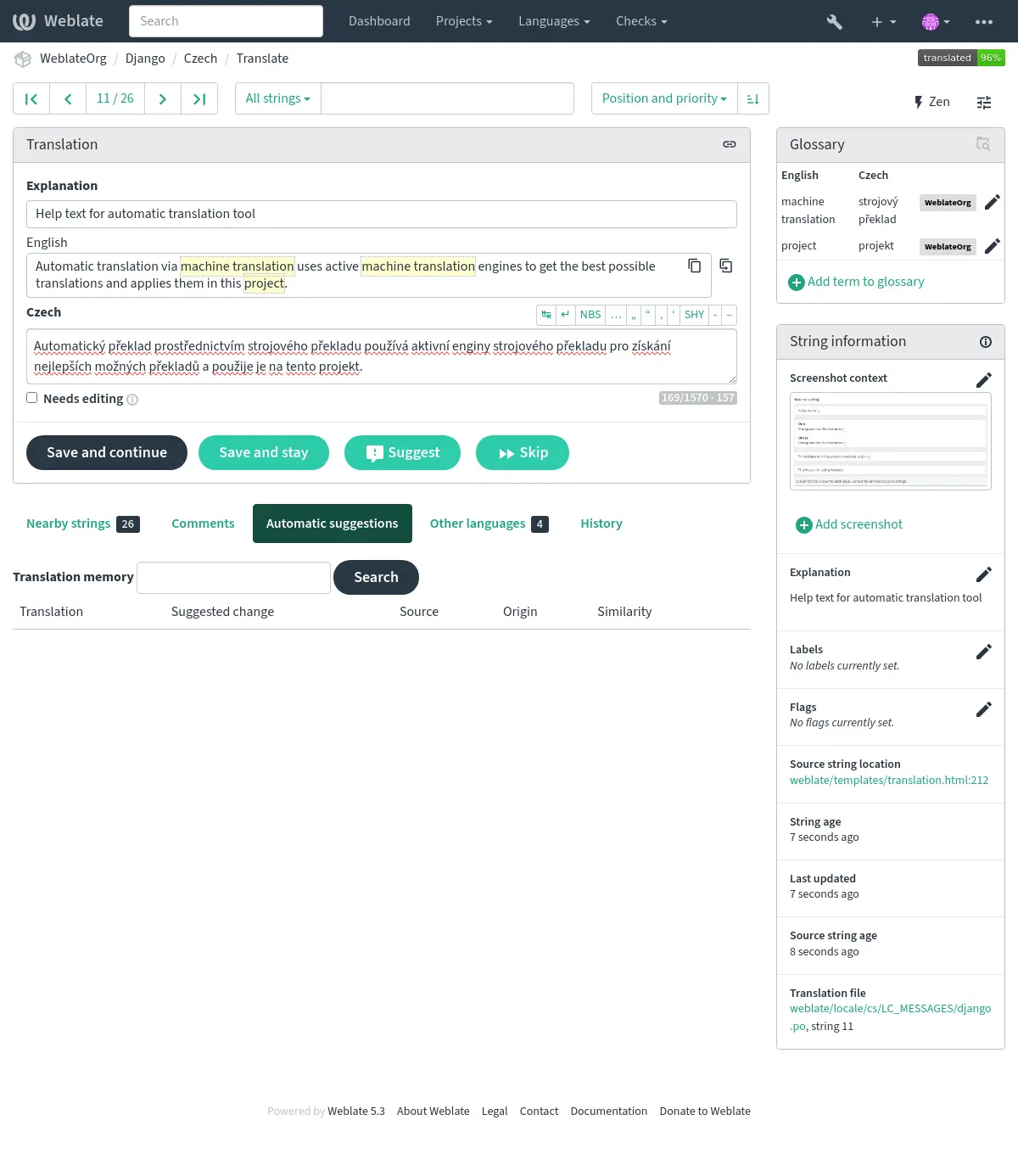
您可以完全由真人翻譯,也可以在有幫助時加入機器翻譯與 AI。工具、審核流程,以及哪些內容會進入儲存庫,都由您的團隊決定。
One workflow you can configure: reuse existing translations first, bring in external services where needed, and require approval before committing.
Hosted Weblate stores and processes customer data and backups in the EU, or you can self-host on your own infrastructure. Integrations you configure can send data elsewhere. See our data residency documentation.
External translation and AI services are optional. Choose providers and workflow stages, configure supported instructions and context, and review the source strings, translations, and context a service can receive before enabling it.
Set permissions for who can see, translate, and review content. Inspect Weblate’s source and published security documentation to evaluate your requirements.
尋找合適的託管方案讓同事、專業譯者與社群貢獻者在同一個地方合作。您可以分配角色、討論重要用字,並肯定每個人的貢獻。
透過通知讓貢獻者掌握進度,並利用進度與活動報告了解哪些地方需要協助。不論您負責產品團隊或招募志工,每個人都能幫忙改善成果。
匯入及匯出譯文、透過 API 連接其他工具,並用附加元件自動處理重複工作。隨著專案成長,您也能管理語言、整理翻譯檔案,讓工作流程順暢進行。
查看說明文件Bring your existing translation files by connecting your Git repository or uploading supported files. Reuse previous work by importing translation memory and glossaries in supported formats.
Start with one component, verify repository synchronization and review settings, then expand. Plan the switch for that component so two platforms do not write competing changes to the same files.
Read the migration guide Discuss your migration在地化應用程式、網站、說明文件等內容,無須更換專案原本使用的格式。請查看下方支援的格式,了解詳細資訊及各格式的功能。
.NET 資源檔案 (RESX, RESW) .resx, .resw Android 字串資源 strings.xml App Store 詮釋資料檔案 .txt Apple iOS 字串 .strings ARB 檔案 .arb AsciiDoc 檔案 .adoc Compose Multiplatform 資源 .xml CSV 檔案 .csv DokuWiki 文字檔案 .dw DTD 檔案 .dtd Excel Open XML .xlsx Flat XML 檔案 .xml Fluent 格式 .ftl Format.JS / React Intl .json GNU gettext .po, .pot, .mo go-i18n JSON 檔案 .json gotext JSON 檔案 .json GWT 屬性 .properties Haiku Catkeys .catkeys HTML 檔案 .html i18next JSON 檔案 .json IDML 格式 .idml INI 翻譯 .ini Inno Setup INI 翻譯 .islu Java properties .properties JavaScript 資源檔案 .resjson Joomla 翻譯 .ini JSON 檔案 .json Laravel PHP 字串 .php Markdown 檔案 .md MDX 檔案 .mdx MediaWiki 文字檔案 .mw @draggable/i18n 語言檔案 .lang Mobile Kotlin 資源 .xml Nextcloud JSON .json OpenDocument 格式 .odt, .ods, .odp PHP 字串 .php Qt Linguist .ts .ts ResourceDictionary 檔案 .xaml Ruby YAML 檔案 .yaml Stringsdict 格式 .stringsdict 字幕檔案 .srt, .sub, .ass, .ssa TermBase eXchange 格式 .tbx 文字檔案 .txt TOML 與 go-i18n TOML .toml Vue I18n .json WebExtension JSON .json Windows RC 檔案 .rc WiX 在地化檔案 .wxl XLIFF 1.1 與 1.2 .xliff XLIFF 2.0 .xliff XWiki 格式 .properties, .xml YAML 檔案 .yaml請參閱格式說明文件,了解支援的變體與限制。
Weblate 是採用 Copyleft 授權的自由軟體:您可以自由使用、檢視、修改及分享。從志工社群到跨國組織,人人都享有這些自由。
Hosted or self-hosted, you use the same Weblate product. Built-in backups support project transfers and full-installation migration as your infrastructure needs change.
您可以選擇由我們的團隊代管 Weblate,或為自行安裝的 Weblate 購買專家支援。遇到問題時,能直接與 Weblate 團隊成員聯繫並取得協助。您購買託管與支援服務,也會資助 Weblate 的持續開發。
您也可以自行託管 Weblate,無須訂閱。符合資格的自由軟體專案可申請免費託管。
See how self-hosting works 自由軟體專案託管服務Let our team run Weblate for you, or self-host it with optional expert support. Your purchases help sustain Weblate’s development.
適合團隊的代管服務
| 託管字串 | 10000 |
| 語言 | 無限制 |
| 專案 | 無限制 |
| 組件 | 無限制 |
| 託管字串 | 40000 |
| 語言 | 無限制 |
| 專案 | 無限制 |
| 組件 | 無限制 |
| 託管字串 | 160000 |
| 語言 | 無限制 |
| 專案 | 無限制 |
| 組件 | 無限制 |
| 託管字串 | 640000 |
| 語言 | 無限制 |
| 專案 | 無限制 |
| 組件 | 無限制 |
| 託管字串 | 2560000 |
| 語言 | 無限制 |
| 專案 | 無限制 |
| 組件 | 無限制 |
| 託管字串 | 10240000 |
| 語言 | 無限制 |
| 專案 | 無限制 |
| 組件 | 無限制 |